Enterprise Resource Planning (ERP): A Complete Guide for Modern Businesses
Introduction to ERP
What Does ERP Stand For?
ERP stands for Enterprise Resource Planning. At its core, ERP is a type of software that helps organizations manage their day-to-day business activities in one unified system. Think of ERP as the brain of a business—it connects finance, HR, sales, inventory, production, and more, all under one roof.
Why ERP Is Important in Today’s Business World
In today’s fast-moving business environment, managing operations through disconnected software tools is like trying to drive a car with five different steering wheels. ERP brings everything together, reduces confusion, and gives leaders a clear, real-time picture of what’s happening across the organization.
Evolution of ERP Systems
Early Business Software
Before ERP, businesses relied on standalone systems for accounting, payroll, and inventory. These systems didn’t talk to each other, leading to duplicated work and frequent errors.
From MRP to ERP
Enterprise Resource Planning (ERP) originated from early manufacturing-focused planning tools known as Material Requirements Planning (MRP) systems. Over time, ERP expanded to include finance, HR, sales, and customer management—turning it into a complete enterprise-wide solution.
Cloud-Based ERP Revolution
The shift to cloud computing transformed ERP. Cloud ERP made systems more affordable, scalable, and accessible from anywhere, opening doors for small and medium businesses that once couldn’t afford ERP solutions.
Core Components of an ERP System
Finance and Accounting
This is the backbone of ERP. It handles general ledger, accounts payable, accounts receivable, budgeting, and financial reporting—ensuring accuracy and compliance.
Human Resource Management
ERP simplifies HR tasks like payroll, attendance, recruitment, performance management, and employee records, saving time and reducing paperwork.
Inventory and Supply Chain
With ERP, inventory levels are tracked in real time. Businesses can avoid overstocking or stockouts while optimizing procurement and logistics.
Sales and Customer Relationship Management
ERP integrates sales orders, invoicing, customer data, and follow-ups, helping teams close deals faster and improve customer satisfaction.
Manufacturing and Production
Manufacturers use ERP to plan production, manage bills of materials, track work orders, and maintain quality control.
How ERP Works
Centralized Database Concept
ERP systems use a single centralized database. This means everyone—from finance to sales—works with the same data, eliminating inconsistencies.
Real-Time Data Processing
Transactions are updated instantly. When a sale happens, inventory reduces, accounts update, and management sees the impact immediately.
Integration Across Departments
ERP acts like a bridge between departments, ensuring smooth communication and collaboration.
Types of ERP Systems
On-Premise ERP
Installed on company servers, on-premise ERP offers full control but requires higher upfront investment and IT maintenance.
Cloud ERP
Hosted on the vendor’s servers, cloud ERP is cost-effective, scalable, and accessible from anywhere with an internet connection.
Hybrid ERP
A mix of on-premise and cloud ERP, hybrid systems offer flexibility for businesses transitioning to the cloud.
Industry-Specific ERP
Some ERP solutions are tailored for industries like education, healthcare, or manufacturing, offering specialized features out of the box.
Key Benefits of ERP
Improved Efficiency
ERP automates repetitive tasks, reduces manual work, and speeds up processes.
Better Decision Making
With real-time reports and dashboards, managers can make informed decisions quickly.
Cost Reduction
ERP reduces operational costs by minimizing errors, improving inventory control, and streamlining workflows.
Enhanced Collaboration
Teams work from the same data source, improving communication and accountability.
ERP for Small, Medium, and Large Enterprises
ERP for Small Businesses
Modern cloud ERP solutions are affordable and scalable, making them ideal for startups and small businesses.
ERP for Mid-Sized Companies
Mid-sized companies benefit from ERP by standardizing processes and supporting growth.
ERP for Large Organizations
Large enterprises use ERP to manage complex operations across multiple locations and departments.
ERP Implementation Process
Requirement Analysis
Understanding business needs is the first step to successful ERP implementation.
ERP Selection
Choosing the right ERP vendor based on features, budget, and scalability is crucial.
Customization and Configuration
ERP systems are configured to match business workflows.
Data Migration
Existing data is cleaned, validated, and migrated to the new system.
Training and Go-Live
Employees are trained before the system goes live to ensure smooth adoption.
Common Challenges in ERP Implementation
High Initial Cost
ERP can be expensive initially, but the long-term ROI often outweighs the cost.
Resistance to Change
Employees may resist new systems. Proper training and communication help overcome this.
Data Migration Issues
Poor data quality can delay implementation if not addressed early.
How to Overcome These Challenges
Strong leadership, clear planning, and expert support make ERP implementation successful.
ERP vs Traditional Software
Key Differences
Traditional software works in silos, while ERP integrates everything into one system.
Why ERP Is Better for Growth
ERP scales with the business, supporting expansion without chaos.
ERP Security and Compliance
Data Security
ERP systems include encryption, backups, and secure access controls.
User Access Control
Role-based access ensures employees see only what they need.
Compliance and Regulations
ERP helps businesses comply with tax laws, audits, and industry standards.
Role of ERP in Digital Transformation
Automation and AI Integration
Modern ERP uses AI to automate forecasting, reporting, and recommendations.
ERP and Business Intelligence
Built-in analytics turn data into actionable insights.
ERP in Industry 4.0
ERP integrates with IoT and smart systems for advanced automation.
Choosing the Right ERP System
Business Size and Needs
Choose an ERP that fits current needs and future growth.
Budget Considerations
Consider total cost of ownership, not just licensing fees.
Vendor Support and Scalability
Reliable support and scalability are critical for long-term success.
Future Trends in ERP
AI-Powered ERP
AI-driven ERP systems will predict trends and automate decisions.
Mobile ERP
Mobile access allows managers to run businesses on the go.
Low-Code and No-Code ERP
Customization becomes easier without heavy coding.
Predictive Analytics
ERP will move from reporting the past to predicting the future.
ERP Use Cases Across Industries
Education
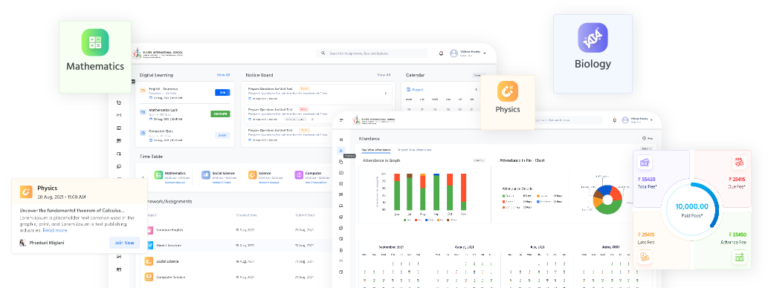
ERP manages admissions, attendance, exams, and fees efficiently.
Healthcare
Hospitals use ERP for patient records, billing, and inventory.
Manufacturing
Manufacturers rely on ERP for production planning and quality control.
Retail
ERP optimizes inventory, sales, and customer experience.
Logistics
ERP improves fleet management, tracking, and delivery performance.
Conclusion: Why ERP Is a Long-Term Investment
ERP is not just software—it’s a strategic investment. It brings clarity, control, and confidence to business operations. In a world driven by data and speed, ERP empowers organizations to stay competitive, agile, and future-ready.
FAQs
1. What is ERP in simple words?
ERP is software that helps manage all business processes in one system.
2. Is ERP only for large companies?
No, modern ERP solutions are suitable for small and medium businesses too.
3. How long does ERP implementation take?
It can take from a few months to over a year, depending on complexity.
4. Is cloud ERP secure?
Yes, cloud ERP uses advanced security and regular updates.
5. What is the biggest benefit of ERP?
Centralized data and improved decision-making are the biggest benefits.
Internal Links:
https://nigamtechnologies.com/
External Links:
🔗 Oracle ERP Cloud Overview – https://www.oracle.com/erp/
🔗 SAP ERP Solutions – https://www.sap.com/products/enterprise-management-erp.html
🔗 Microsoft Dynamics 365 ERP – https://dynamics.microsoft.com/erp/overview/
🔗 IBM ERP Insights – https://www.ibm.com/topics/erp